
Module 1: Introduction to CCTV
CCTV is the starting point for everything this course builds on — before learning how cameras, cables, or recorders work, you need to understand what CCTV actually is, why it exists, and the language used to talk about it. A technician who skips this groundwork ends up learning terms backwards, picking them up piecemeal on the job instead of having a clear foundation to build real skill on. This module gives you that foundation: what CCTV means, why it’s installed, and the vocabulary you’ll use in every step that follows.
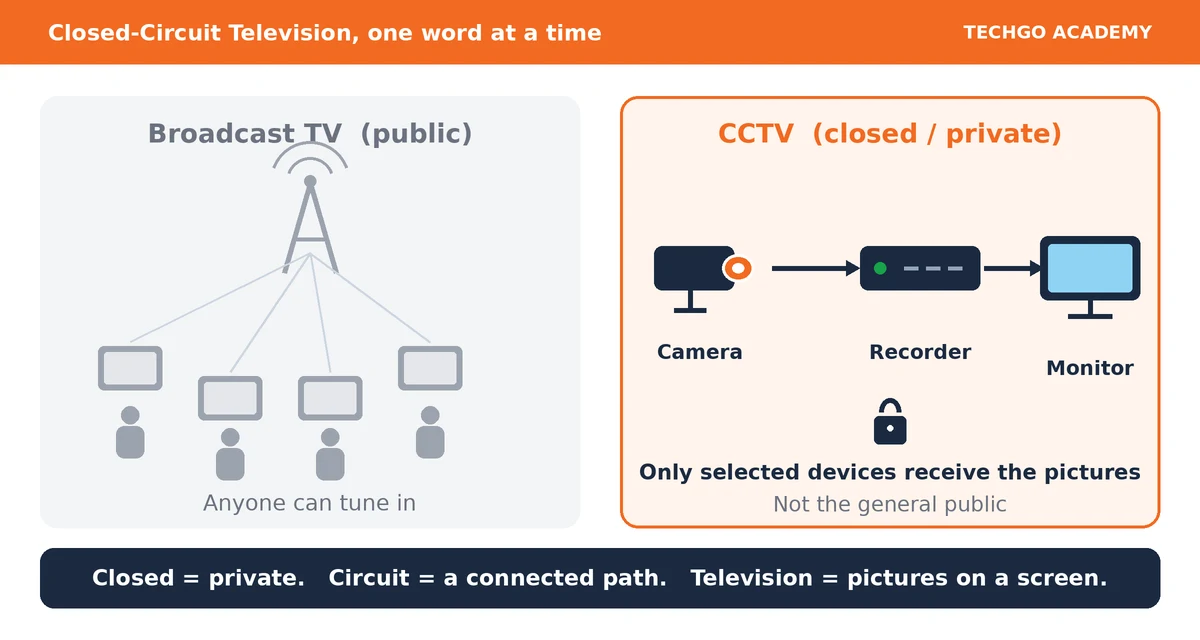
CCTV is a private video surveillance system that sends images from cameras to specific monitors or recorders for security, monitoring, and evidence.
Everyday example
A camera at a bank entrance sends its video only to the security room’s recorder and monitor. People watching ordinary TV at home cannot receive that video because it is a closed circuit.
Key learning point
A CCTV system is private, while television broadcasting is public.
Checkpoint: In your own words, what do you think the word “Closed” means in CCTV?
CCTV is installed for five primary purposes. This is the foundation every professional technician must know.
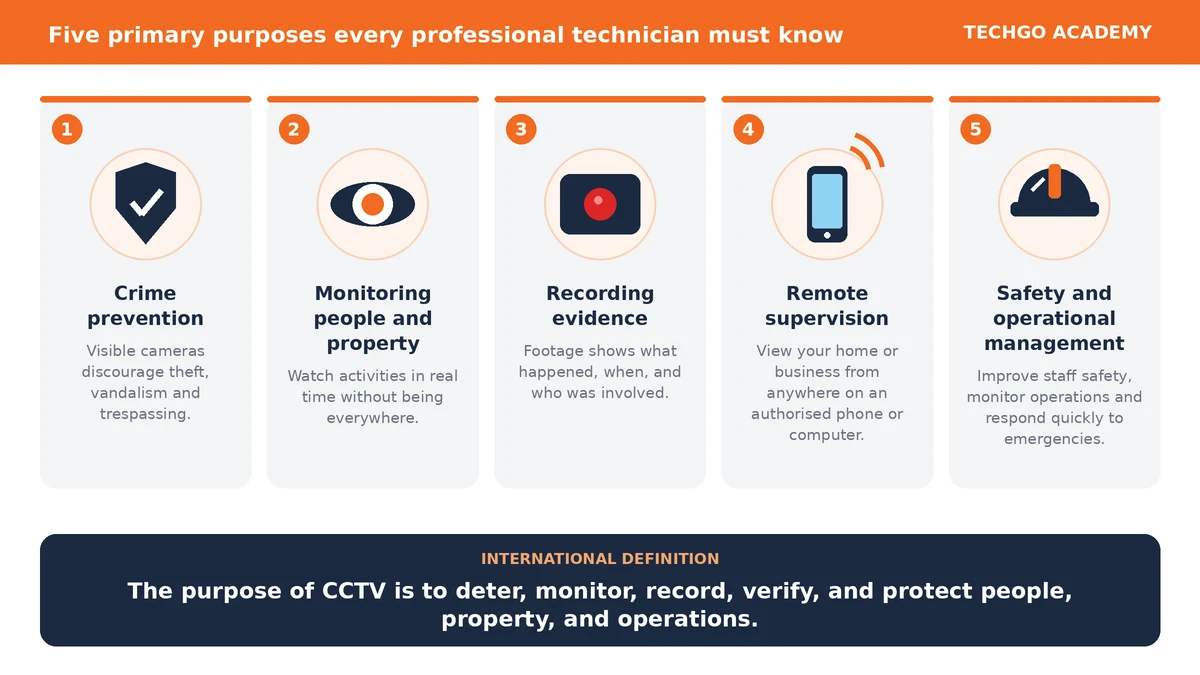
1. Crime prevention
A visible camera discourages many criminals from attempting theft, vandalism, or trespassing because they know they may be recorded.
2. Monitoring people and property
Security personnel can watch activities in real time without being physically present everywhere.
3. Recording evidence
When an incident occurs, recorded footage can help identify what happened, when it happened, and who was involved.
4. Remote supervision
Modern IP CCTV systems allow owners to view their homes or businesses from anywhere using an authorized phone or computer.
5. Safety and operational management
CCTV is not only for catching criminals. It also helps improve staff safety, monitor operations, and respond quickly to emergencies.
Definition
The purpose of CCTV is to deter, monitor, record, verify, and protect people, property, and operations.
Quick knowledge check
Question: Which one of these is not the primary purpose of CCTV?
A. Crime prevention
B. Remote supervision
C. Cooking food
D. Recording evidence
Reply with A, B, C, or D, and then we’ll move to the next bullet: Basic CCTV system components.
What CCTV Terminology Actually Is
It’s the technical vocabulary used to describe CCTV equipment, operation, installation, and troubleshooting. If a technician says “the IP camera is online, but the NVR isn’t receiving its main stream because of an addressing problem,” a beginner hears noise — a trained technician understands exactly what’s wrong. Terminology isn’t about memorising words for their own sake; it’s the language that lets you actually think and communicate about these systems.
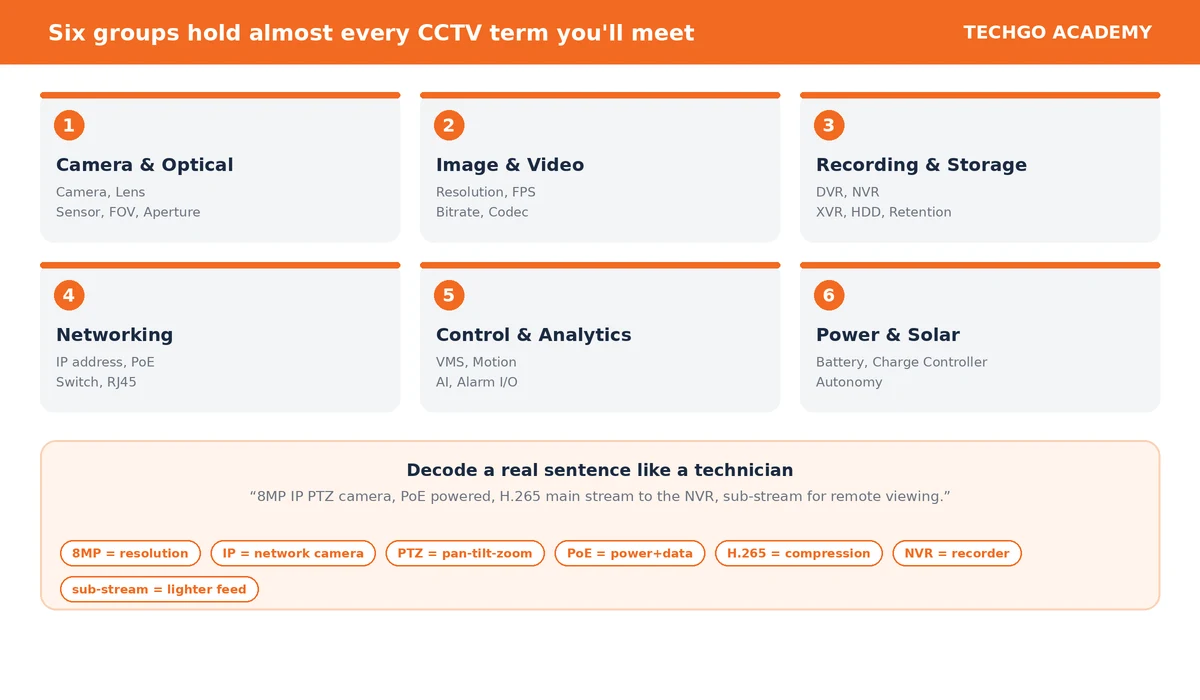
We’ll go through six groups: camera/optical, image/video, recording/storage, networking, control/analytics/management, and power/installation.
Camera and Optical Terms
- Camera — captures a scene and turns it into video. A modern IP camera may also process, encode, analyse, network, and store the video itself.
- Image sensor — receives light and converts it into the electronic information an image is built from. Most modern CCTV cameras use CMOS sensors.
- Lens — directs light onto the sensor; affects field of view, magnification, distance, and how much light gets through. A good camera with the wrong lens still gives a poor result.
- Focal length — measured in mm (e.g. 2.8mm, 4mm, 6mm, 12mm). Shorter = wider view; longer = narrower view.
- Field of View (FOV) — how much of the scene the camera actually sees. A compound needs a wide FOV; a distant gate may need a narrow one.
- Aperture — the opening light passes through in the lens; affects low-light performance and depth of field.
Camera Movement Terms
- PTZ — Pan-Tilt-Zoom: a camera that can change direction and magnification mechanically.
- Pan — side-to-side movement.
- Tilt — up-and-down movement.
- Zoom — changing magnification. Optical zoom uses the lens itself; digital zoom just enlarges part of the existing image — these are not the same thing, and digital zoom doesn’t add real detail.
- Preset — a saved PTZ position (e.g. “Preset 1 — Main gate”).
- Patrol — a programmed sequence moving between presets automatically.
Image and Video Terms
- Pixel — one picture element making up a digital image.
- Resolution — how many pixels make up the image (e.g. 1920×1080 ≈ 2 million pixels ≈ 2MP). More resolution means more potential detail, but lighting, lens, focus, and compression all matter too.
- Megapixel (MP) — roughly one million pixels; an 8MP image has roughly eight million.
- Frame rate / FPS — how many frames are captured or shown per second. Higher FPS gives smoother motion but costs more bandwidth and storage.
- Resolution vs FPS — resolution is about detail in each frame; FPS is about how often frames update. Don’t confuse the two.
- Bitrate — how much data represents the video stream over time (Kbps/Mbps); affects quality, bandwidth, and storage.
- Compression / Codec — technology (like H.264 or H.265) that shrinks video data so it doesn’t need huge storage or bandwidth to carry.
Image-Quality Terms
- WDR (Wide Dynamic Range) — helps a camera handle scenes with both very bright and very dark areas at once (e.g. someone standing against a bright window).
- BLC (Backlight Compensation) — improves visibility of a subject when strong light is behind them.
- HLC (Highlight Compensation) — manages very bright spots, like headlights at night.
- IR (Infrared) — illumination many cameras use to see in low light.
- Lux — a unit of illuminance; manufacturers quote minimum lux figures, but a single lux number alone doesn’t tell you everything about night performance.
- Day/Night camera — designed to work in both daylight and low light, usually switching via an IR-cut filter.
Recording Terms
- DVR — Digital Video Recorder, traditionally tied to analogue/HD-over-coax systems.
- NVR — Network Video Recorder, built to receive network video streams from IP cameras.
- XVR — a recorder that can handle multiple camera technologies (always check the exact model’s real capabilities).
- Channel — a logical camera position on a recorder (Channel 1 = Camera 1, etc.) — a “32-channel NVR” doesn’t automatically mean all 32 can run at full resolution simultaneously; the recorder’s total bandwidth matters too.
- Live vs Playback — live is Camera → User right now; playback is Storage → Recorder → User, watching something already recorded.
- Recording types — continuous, scheduled, motion-triggered, event-triggered, alarm-triggered.
- Retention — how long footage stays before being overwritten. “30 days of retention” isn’t just “buy a 30-day hard drive” — the actual storage needed has to be calculated from the real video settings.
Storage Terms
- HDD — Hard Disk Drive, the standard CCTV recording storage.
- Storage capacity — measured in GB (Gigabyte) or TB (Terabyte).
- microSD card — some cameras record locally onto their own card (“edge” recording), useful when central recording isn’t available.
- NAS — Network Attached Storage, a storage system reachable over the network.
Stream Terms
- Video stream — the continuous flow of video data a camera sends.
- Main stream — usually the higher-quality stream, mainly for recording.
- Sub-stream — usually lower resolution/bitrate, good for mobile or remote viewing where bandwidth is limited.
- Third stream — some cameras offer an extra stream; its purpose varies by manufacturer.
Network Terms
- IP (Internet Protocol) — the fundamental system devices use to identify and talk to each other on a network.
- IP camera — a camera that communicates over a network and normally has its own IP address.
- IP address — a logical network address (e.g. 192.168.1.100).
- MAC address — a hardware identifier tied to the device itself, different from its IP address.
- DHCP — automatically hands out IP addresses to devices on a network.
- Static IP — a manually assigned, fixed address — commonly used for cameras, NVRs, and other fixed infrastructure.
Subnets and gateways go a layer deeper into how networks are actually organised — covered properly at Professional level (Level 6: CCTV Networking).
Network Equipment Terms
- Switch — connects devices on a network and passes traffic between them.
- PoE (Power over Ethernet) — delivers both power and data over one Ethernet cable.
- UTP — Unshielded Twisted Pair, the cable type used for Ethernet.
- Cat5e / Cat6 — categories of Ethernet cable, Cat6 rated for higher performance.
- RJ45 — the standard Ethernet connector.
- Uplink — a connection from one network device up to another, larger part of the network.
How much power a PoE switch can actually deliver across all its ports at once — the “PoE budget” — and how to calculate it properly for a real job, is covered at Professional level (Module 18: PoE).
VMS and Management Terms
- VMS (Video Management System) — software managing cameras and video: live view, recording, playback, users, events, sometimes analytics.
- Firmware — the built-in software that runs a camera, NVR, DVR, or switch.
- Remote viewing — accessing footage from outside the local installation, e.g. Camera → Internet → Phone.
- Cloud — a platform that provides some surveillance functions over the internet rather than purely on local hardware.
Event and Analytics Terms
- Motion detection — flags changes in the image based on configured rules; doesn’t necessarily mean a person was detected, just that something changed.
- AI analytics — algorithms that identify specific things: people, vehicles, line crossing, intrusion, faces, and more, depending on the equipment.
- Event — anything the system detects or generates — motion, a disconnected camera, a failed hard drive, an alarm trigger.
- Alarm input — lets an external device (a PIR sensor, door contact, panic button) send a signal into the CCTV system.
- Alarm output — lets the CCTV system trigger something external, like a siren or warning light.
Solar CCTV Terms
- Solar panel — converts sunlight into electricity.
- Charge controller — regulates how the battery charges from the solar panel.
- Battery — stores energy for when the sun isn’t generating enough — especially important at night.
- Solar PTZ — a PTZ camera run on a solar power system: Solar Panel → Controller → Battery → Camera, communicating separately via 4G/Wi-Fi → Internet → User.
- Autonomy — how many days a solar system can keep running on stored battery alone, with little or no sun. A system expecting several cloudy days needs its battery and panel sized for that — a real design consideration.
Terms That Get Confused
- Resolution vs FPS — detail vs frame speed.
- Bitrate vs Bandwidth — the data rate of one stream vs the total capacity available to carry data.
- DVR vs NVR — analogue/HD-over-coax vs network/IP.
- Optical zoom vs Digital zoom — real magnification vs enlarging the existing image.
- PoE vs Internet — PoE is about power delivery, nothing to do with internet access by itself.
- IP camera vs Internet camera — an IP camera is a network camera; it can run entirely on a local network with no internet connection at all.
Decoding a Real Technical Sentence
A trained technician should be able to unpack something like: “The 8MP IP PTZ camera is connected through Cat6 to a PoE switch. The main stream is configured at 25 FPS using H.265, while the sub-stream is used for remote viewing. The NVR records to a surveillance HDD.”
That breaks down piece by piece: 8MP (resolution), IP (network architecture), PTZ (movement), Cat6 (cable type), PoE (power+data), main stream (primary video), 25 FPS (frame rate), H.265 (compression), sub-stream (lower-bandwidth video), NVR (recorder), HDD (storage). That’s the whole point of learning this vocabulary — being able to decode a real sentence like that instantly.
The Technician’s Six Questions
Whenever you meet an unfamiliar CCTV system, ask:
- What captures the image? (Camera + lens + sensor)
- How does the video travel? (Coax / Ethernet / fibre / wireless)
- What processes or records it? (DVR / NVR / XVR / VMS)
- Where is it stored? (HDD / SD card / NAS / server / cloud)
- How does the user interact with it? (Monitor / VMS / mobile app)
- How is everything powered? (AC / DC / PoE / battery / solar)
Step 1.6 — Knowledge Check
- What does PTZ stand for?
- What’s the difference between resolution and FPS?
- What’s the difference between bitrate and bandwidth?
- What’s the difference between a DVR and an NVR?
- What does PoE mean?
- What’s the difference between optical zoom and digital zoom?
- What does FOV mean?
- What’s the difference between a main stream and a sub-stream?
- In a solar PTZ system, what’s the difference between the power path and the video/data path?
Mastery Test: Explain this sentence in plain language: “The 8MP IP PTZ camera is powered by PoE, sends an H.265 main stream to the NVR, while its sub-stream is used for remote viewing.”
Module 2: Basic Electricity for CCTV
Every CCTV system needs electrical energy to run — the camera, the DVR/NVR, a PoE switch, an infrared illuminator, even the hard drive inside the recorder. So when a device doesn’t work, the real problem might not be the device itself — it could be power. A camera showing “No Video” could mean no power reaching it, wrong voltage, not enough current, a broken cable, wrong polarity, a short circuit, or an actual camera fault. This module gives you the electrical foundation to tell these apart.
Voltage — The Electrical Push
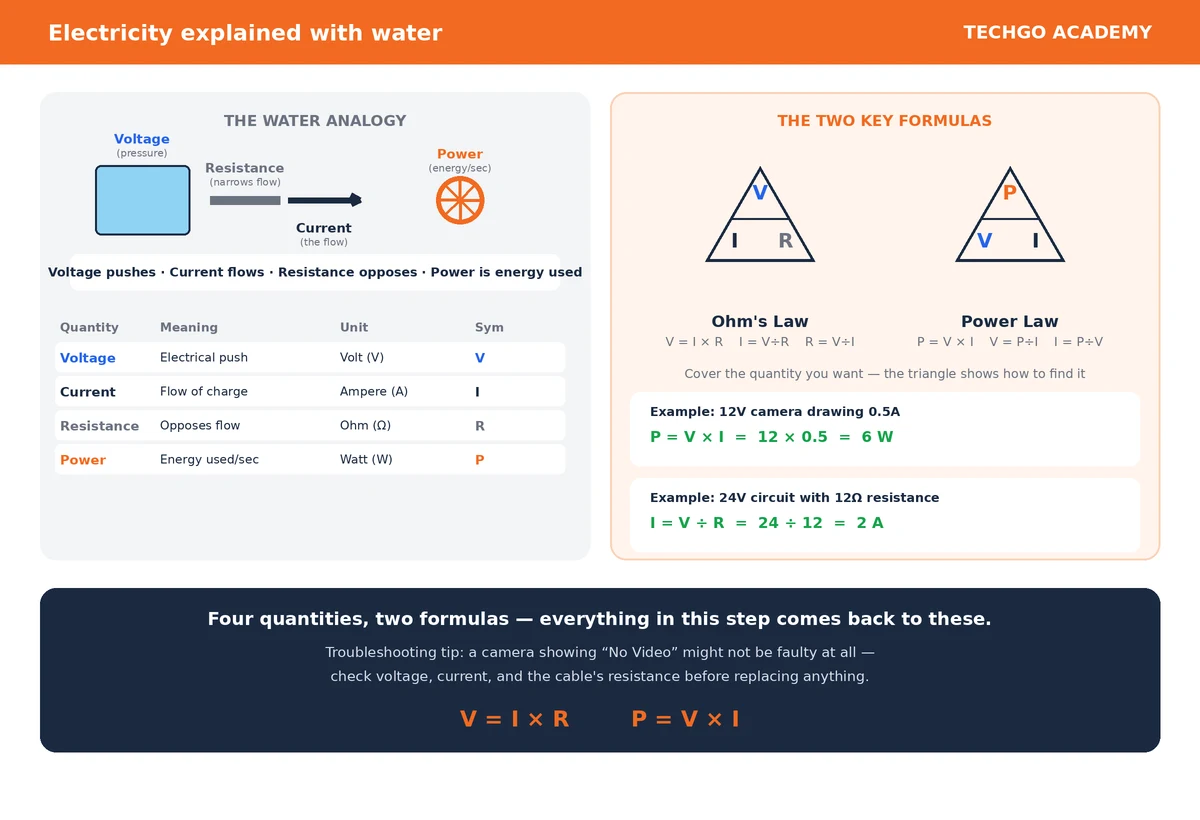
Voltage is the electrical pressure or push that causes current to move through a circuit. Symbol: V. Unit: volt (V).
Think of electricity like water flowing through a pipe: imagine a water tank high above the ground — the water has pressure because gravity pulls it down. Voltage works the same way, providing the push that makes current flow.
A camera labelled “12V DC” is designed to receive 12 volts of electrical potential. A power supply might be labelled “12V DC” or “Output: 12V ⎓” — either way, the 12V tells you the voltage that output provides.
Important: voltage is not the same as current. A 12V supply tells you the electrical pressure available — it doesn’t by itself tell you how much current the camera will actually draw.
Current — The Flow of Electricity
Current is the flow of electric charge through a circuit. Symbol: I. Unit: ampere, or amp (A). For small CCTV devices you’ll often see milliamperes (mA) — 1A = 1,000mA, so 500mA = 0.5A.
Back to the water analogy: if voltage is the pressure pushing the water, current is the actual amount of water flowing through the pipe. Voltage pushes; current flows.
A camera labelled “12V DC, 0.5A” tells you two separate things: 12V is the required voltage, 0.5A is roughly how much current it can draw under normal conditions. This distinction matters a lot when selecting the right power supply.
Resistance — Opposition to Current
Resistance is the opposition to current flow. Symbol: R. Unit: ohm (Ω).
A wide, clear pipe lets water flow easily; a narrow or blocked one makes it harder. Resistance works the same way — more resistance means current has a harder time flowing.
In a CCTV installation, resistance can come from the components themselves, the cable’s length, the material the cable is made of, poor or loose connections, damaged conductors, or undersized cabling. This matters especially when power has to travel a long distance to a camera — the cable’s resistance can cause some of the available voltage to be lost along the way (this is called voltage drop, studied later in the course).
Power — How Much Electrical Energy Is Being Used
Electrical power is the rate at which electrical energy is used or transferred. Symbol: P. Unit: watt (W).
A spec reading “12V, 10W camera” means the camera needs roughly 10 watts of power under those conditions — this matters directly when sizing a power supply.
The Power Law
The key relationship: P = V × I
Where P = power (watts), V = voltage (volts), I = current (amps).
Example: A camera runs at 12V and draws 0.5A. P = 12 × 0.5 = 6W.
Since P = V × I, the formula can be rearranged two more useful ways:
- To find current: I = P ÷ V
- To find voltage: V = P ÷ I
How the Four Quantities Relate
| Quantity | Meaning | Unit | Symbol |
|---|---|---|---|
| Voltage | Electrical push | Volt | V |
| Current | Flow of electrical charge | Ampere | I |
| Resistance | Opposition to current | Ohm | R |
| Power | Rate of electrical energy use | Watt | P |
A simple way to hold it in your head: Voltage pushes. Current flows. Resistance opposes. Power tells you how much energy is being used.
Ohm’s Law
A second fundamental relationship connects voltage, current, and resistance:
V = I × R
Rearranged: I = V ÷ R and R = V ÷ I
Example: A circuit has 12V and 6Ω of resistance. I = V ÷ R = 12 ÷ 6 = 2 amperes.
What You Should Understand Before Moving On
- Voltage — the electrical push
- Current — the flow of electrical charge
- Resistance — opposition to current flow
- Power — the rate electrical energy is being used
Plus the two core formulas: Ohm’s Law (V = I × R) and the Power Law (P = V × I). These come back constantly once we get into real CCTV power supplies and installations.
Step 2.1 — Knowledge Check
- What is voltage, and what unit is it measured in?
- What is electrical current, and what unit is it measured in?
- What does resistance do to current, and what unit is it measured in?
- What is electrical power, and what unit is it measured in?
- A camera operates at 12V and draws 0.5A — what’s its power consumption?
- Write Ohm’s Law.
- Write the formula for calculating power.
- A circuit has 24V and 12Ω of resistance — what current flows through it?
Key formulas:
V = I × R · I = V ÷ R · R = V ÷ I · P = V × I
What Does AC Mean?
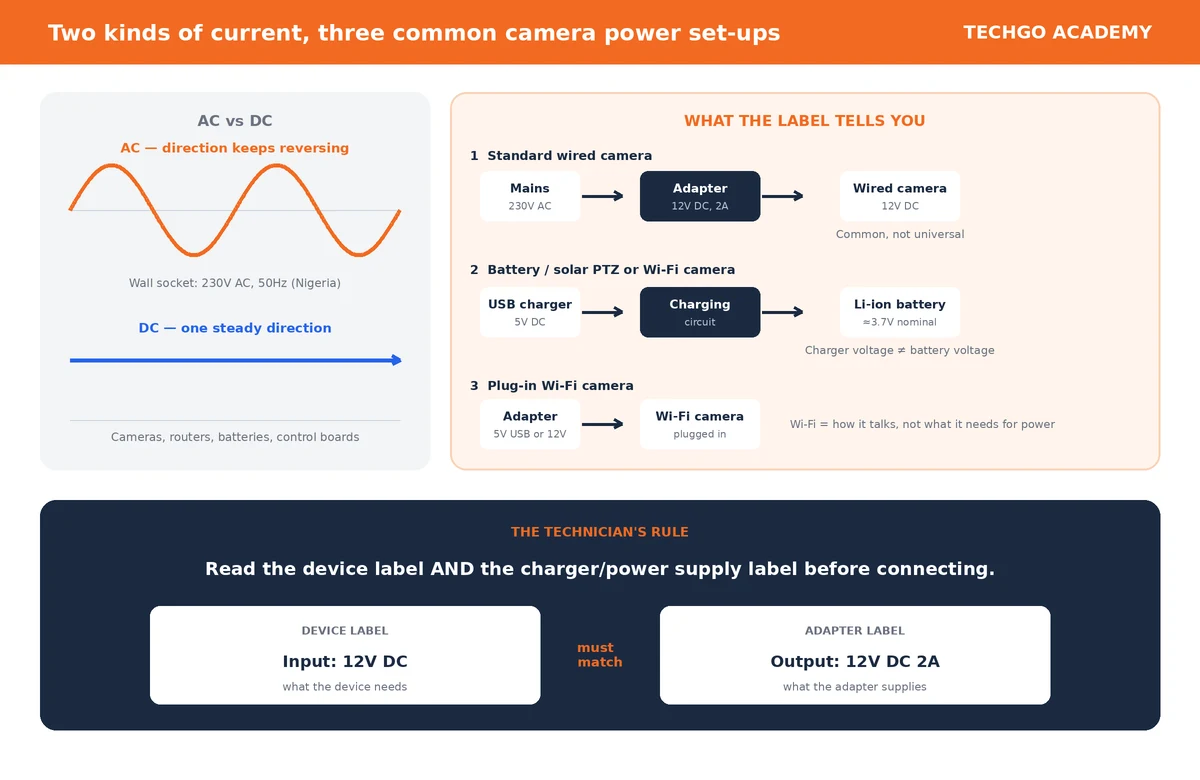
AC means Alternating Current. In an AC circuit, the direction of current changes repeatedly. The electricity from ordinary building wall sockets is AC. In Nigeria, the nominal mains supply is generally 230V AC, 50Hz.
AC is electrical current that alternates direction periodically.
What Does DC Mean?
DC means Direct Current. In a DC circuit, current flows in one direction. Many electronic devices, including many CCTV devices, run on DC power. Examples include CCTV cameras, routers, some network switches, electronic control boards, and battery-powered devices.
DC is electrical current that flows in one direction.
AC and DC — The Simple Difference
Imagine electricity as movement along a road.
- DC: → → → → →
- AC: → ← → ← → ←
AC alternates direction. DC keeps one direction.
Why Does This Matter to a CCTV Technician?
CCTV equipment is designed for a particular type of electrical supply. A device may require DC while the building’s socket supplies AC. You therefore cannot simply plug every CCTV device straight into a wall socket. The correct supply must be provided according to the device’s specification.
12VDC — A Common CCTV Voltage
12VDC is one of the most common operating voltages for standard wired CCTV cameras. A wired camera may be labelled “12V ⎓” or “12V DC”, meaning it is designed to receive approximately 12 volts of direct current.
Do not turn this into a universal rule. 12VDC is common for standard wired CCTV cameras, but it is not the voltage used by every CCTV camera. Different cameras and devices can need different voltages. This matters more as CCTV increasingly includes battery-powered, solar-powered, and Wi-Fi equipment.
Battery-Powered and Solar PTZ/Wi-Fi Cameras
Some small wireless cameras and solar-powered PTZ cameras contain a rechargeable lithium-ion (Li-ion) battery. A common Li-ion cell has a nominal voltage of approximately 3.7V DC.
The word nominal matters. It means the battery is described by its normal rated voltage, not that it stays at exactly 3.7V at every moment. Its actual voltage changes with its state of charge. The camera’s internal electronics are designed to work from the battery accordingly.
How Are These Cameras Charged?
A camera with a rechargeable Li-ion battery often has a USB-type charging input and is commonly charged from a 5V USB-type charger.
The 5V charger does not put 5V directly onto the 3.7V battery. The camera has a built-in charging circuit that controls the charging process:
5V USB charger → camera’s charging circuit → rechargeable Li-ion battery
So do not confuse the two figures: battery nominal voltage is about 3.7V, while charger output is commonly 5V. They are not necessarily the same.
Plug-In Wi-Fi Cameras
Not all Wi-Fi cameras are battery powered. Some stay plugged into a power source. Depending on the camera, the power input is commonly 5V USB, a 12V DC adapter, or another voltage specified by the manufacturer.
Wi-Fi does not automatically mean 5V. Wi-Fi describes how the camera communicates on the network, not what it needs for power. A Wi-Fi camera can still need a wired power connection.
The Technician’s Rule
Because CCTV devices use different voltages, do not guess. Always check:
- The device label, for information such as “Input: 12V DC” or “Input: 5V ⎓”
- The charger’s or power adapter’s output, such as “Output: 5V DC” or “Output: 12V DC”
Always read the device’s rated voltage and the charger’s or power supply’s output specification on the label before connecting them.
Do not rely only on the connector’s appearance, the fact that another camera uses 12V, the fact that the camera is a Wi-Fi model, or the fact that a charger physically fits.
AC-to-DC Power Supplies
A common CCTV arrangement:
AC mains → power supply/adapter → DC CCTV device
For example: 230V AC → 12V DC power supply → 12V DC wired camera. The power supply converts the incoming supply into the form and voltage the device needs.
Reading a Power Adapter Label
Suppose an adapter carries this label:
INPUT: 100–240V AC
OUTPUT: 12V DC 2A
- INPUT: 100–240V AC — what the adapter expects at its input. It accepts AC within that range.
- OUTPUT: 12V DC — the voltage it supplies: 12 volts DC.
- OUTPUT: 2A — the maximum current capacity under its specified conditions.
The adapter is effectively saying: “Give me the appropriate AC input, and I can provide 12V DC with up to 2A of current capacity.”
A 5V USB Charger Example
A small Wi-Fi camera has a charging input designed for 5V USB, and the charger says OUTPUT: 5V DC 2A. The charger provides 5V DC, and the camera’s internal charging circuitry manages charging its rechargeable battery. Do not assume the battery itself is a 5V battery just because the charger supplies 5V.
AC and DC Can Exist in the Same Installation
A single CCTV installation can contain both.
- Wired camera: building mains (230V AC) → power adapter → 12V DC → camera
- Solar/Wi-Fi camera: solar panel → charging circuit → rechargeable Li-ion battery → camera electronics
Understanding AC and DC is fundamental to understanding CCTV power systems.
What You Should Remember
- AC = Alternating Current. The direction of current alternates periodically.
- DC = Direct Current. The current flows in one direction.
- 12VDC is a common voltage for standard wired CCTV cameras, but it is not universal.
- Some battery-powered and solar PTZ/Wi-Fi cameras use rechargeable Li-ion batteries with a nominal voltage of about 3.7V DC.
- Such cameras are commonly charged through a 5V USB-type charger via the camera’s built-in charging circuit.
- Plug-in Wi-Fi cameras may use 5V USB or 12V DC adapters, depending on the model.
- The golden rule: always read the device’s rated voltage and the charger’s or power supply’s output specification on the label before connecting them.
Step 2.2 — Knowledge Check
- What does AC stand for?
- What does DC stand for?
- What is the basic difference between AC and DC?
- What type of electricity is normally supplied through a building’s wall socket?
- Why is 12VDC commonly found in standard wired CCTV cameras?
- Is 12VDC the universal voltage for all CCTV cameras?
- What is the approximate nominal voltage of a common rechargeable Li-ion cell used in small wireless/solar cameras?
- Why can a camera with a 3.7V nominal battery be charged through a 5V USB-type charger?
- What is the function of the camera’s built-in charging circuit?
- What are two common power arrangements for plug-in Wi-Fi cameras?
- If a charger physically fits a camera, does that mean it is electrically suitable? Explain.
- What should a technician check on both the device and the charger/power supply before connecting them?
Remember: Standard wired CCTV camera → commonly 12VDC. Small rechargeable camera battery → commonly about 3.7V nominal. USB-type charger → commonly 5V DC. But always check the manufacturer’s rating, and never assume the voltage from the connector or from another CCTV device.
Now we move from what AC and DC are to a practical CCTV question: how much electrical power does a device need, and how do we connect its DC supply correctly?
What Is Power Consumption?
Power consumption tells us how much electrical power a device uses while operating. It is measured in watts (W).
A camera might be rated “12V DC, 6W”, meaning it uses about 6 watts under its specified operating condition. Another rated “12V DC, 12W” needs more power.
Power consumption tells us how much electrical power a device uses.
Power, Voltage and Current
From Step 2.1: P = V × I, where P is power in watts, V is voltage in volts, and I is current in amperes.
Example: a camera operates at 12V DC and draws 0.5A.
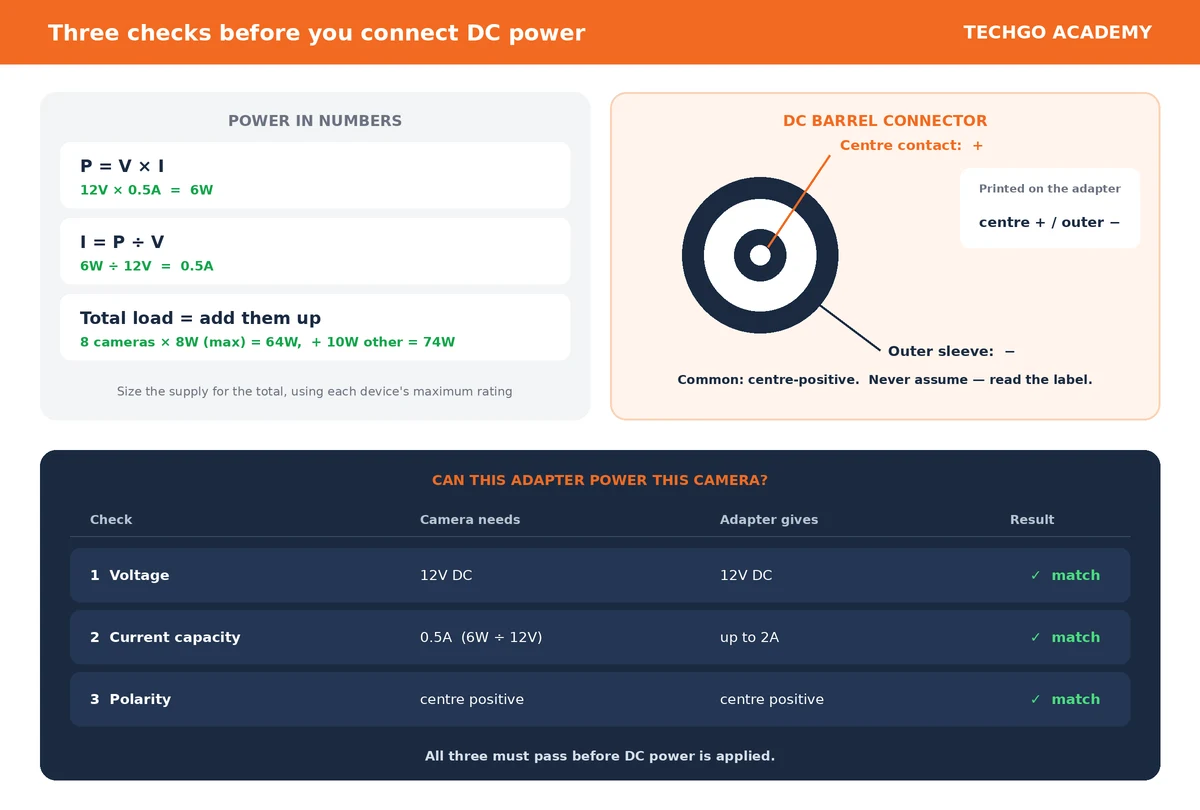
P = V × I = 12 × 0.5 = 6W
Calculating Current from Power
Sometimes the specification gives voltage and power instead of current. Rearrange the formula: I = P ÷ V
Example: a camera consumes 6W at 12V DC.
I = 6 ÷ 12 = 0.5A
Why Power Consumption Matters in CCTV
It matters most when you install several cameras. If one camera needs 6W:
- Four identical cameras: 6W × 4 = 24W
- Ten identical cameras: 6W × 10 = 60W
The more devices connected to a power supply, the greater the total power requirement. This is why a technician must consider the total load when selecting a CCTV power supply.
Cameras Do Not Always Consume the Same Power
A camera’s consumption changes with what it is doing. A basic fixed camera may use relatively little power. A camera with extra features may use more. Examples include:
- infrared illumination
- white-light illumination
- motorized zoom
- PTZ movement
- heaters
- fans
- microphones
- advanced processing
A PTZ camera can therefore need substantially more power than a simple fixed camera. Consult the manufacturer’s specification rather than assuming every camera uses the same amount.
Maximum Power Consumption
Some specifications give both a normal figure and a maximum. For example: Power consumption: 5W, Maximum: 8W.
The maximum matters because the device may need more power under certain conditions. When designing a power system, use the maximum rated requirement, especially when working out the capacity needed for several devices.
What Is Polarity?
Polarity refers to the positive and negative sides of a DC connection. DC power has a positive (+) side and a negative (−) side, for example +12V DC and 0V / −.
Where equipment is polarity-sensitive, the device and its power supply must be connected with the correct polarity.
Positive and Negative Are Not Live and Neutral
In a DC circuit we talk about positive (+) and negative (−). In an AC mains circuit we talk about live and neutral, and where applicable earth.
Do not treat positive and negative as the DC versions of live and neutral. They belong to different electrical systems.
CCTV DC Connector Polarity
A common CCTV power connector is the DC barrel connector. It has two contacts: the centre contact and the outer contact.
A common arrangement is centre = positive (+), outer = negative (−), called centre-positive. Do not assume this blindly. Always check the equipment label or the manufacturer’s specification.
Why Polarity Matters
Suppose a camera expects +12V on its positive terminal and 0V/− on its negative terminal. If the connection is reversed, the camera may:
- fail to operate
- trigger its protection circuitry
- or, depending on the device, be damaged
Modern equipment may have reverse-polarity protection, but never depend on it. Verify polarity before connecting the DC supply.
Reading a Polarity Symbol
A polarity diagram is often printed on a power adapter. A common symbol shows the centre as positive and the outer sleeve as negative. The polarity may also be printed beside the output specification, for example:
Output: 12V ⎓ 2A, followed by a symbol showing centre + / outer −
Confirm that this matches the device’s requirement.
A Simple Example: Is This Adapter Suitable?
The camera’s specification says:
- Input: 12V DC
- Power: 6W
- Polarity: centre positive
The adapter says:
- Output: 12V DC, 2A
- Centre positive
Check each in turn:
- Voltage: camera 12V, adapter 12V. ✓ Matches.
- Current capacity: the camera needs I = P ÷ V = 6 ÷ 12 = 0.5A. The adapter can supply 2A. ✓ Sufficient.
- Polarity: camera centre positive, adapter centre positive. ✓ Matches.
Based on these specifications, the adapter is electrically suitable for the camera.
Total Power for Multiple Cameras
Suppose you have 8 cameras, each with a maximum power requirement of 8W.
Total maximum camera power = 8 × 8W = 64W
If the same supply must also power another device that needs 10W:
64W + 10W = 74W
That gives you a starting point for choosing a power source. If the same power supply also feeds other equipment, include their requirements in the total. Power-supply sizing and power budgeting are covered in more depth later in the course.
The Technician’s Three Basic Checks
Before connecting a DC power supply to a CCTV device, establish these three things:
- Voltage: is the voltage correct?
- Current capacity: can the power supply provide enough current for the device?
- Polarity: are the positive and negative connections correctly arranged?
Correct voltage + sufficient current capacity + correct polarity are the fundamental checks before applying DC power.
Key formulas
P = V × I · I = P ÷ V · V = P ÷ I
Key rule: never select or connect a CCTV power supply by looking only at the connector. Check the rated voltage, the current requirement and capacity, and the polarity.
Step 2.3 — Knowledge Check
- What does power consumption mean?
- What is the unit of electrical power?
- Write the formula for calculating power.
- A camera operates at 12V and draws 0.5A. Calculate its power consumption.
- A camera consumes 12W at 12V. Calculate its current.
- Why can a PTZ camera need more power than a simple fixed camera?
- What is polarity?
- What are the two basic polarities in a DC circuit?
- In a common CCTV DC barrel connector, which contact is often positive?
- Why should a technician not assume every DC barrel connector is centre-positive?
- What could happen if the polarity is reversed?
- Eight cameras each need a maximum of 8W. What is their combined maximum power requirement?
- What three things should a technician check before connecting a DC power supply to a CCTV device?
On the site:
- In the pane with anchor
step-2-3, change the title to “Step 2.3 — Power Consumption, Polarity” and replace its content with the above. The anchor staysstep-2-3. - In the Full Course Outline, change the Step 2.3 link text to match. The target stays
#step-2-3. - Leave the panes and links for 2.4 to 2.7 alone for now. They get cleaned up as Short Circuits and Basic Electrical Safety arrive. Still open: the old “Power Consumption” and “Polarity” lines in the outline now duplicate this step, so they must be removed at that point.
What I left out: ChatGPT’s section 2.3.13 (“A Different Voltage Example”). It repeats the 3.7V battery and 5V USB charger points that Step 2.2 already teaches in full, which is the kind of overlap you have ruled out. If you want it back, say so and I’ll add it.
A short circuit is one of the most important electrical faults a CCTV technician must understand. It can cause equipment failure, power-supply shutdown, overheating, damaged cables, or even fire.
What Is a Short Circuit?
A short circuit occurs when electrical current finds an unintended path with very low resistance. Instead of following the normal path through the device or load, the current takes the easier, unintended path.
Think of water flowing through a pipe. Normally the water is directed through the equipment that uses it. If someone creates a large shortcut around that equipment, much more water rushes through the shortcut. A short circuit is the same: electricity gets an unintended shortcut.
A Normal CCTV Circuit
A simple DC CCTV circuit:
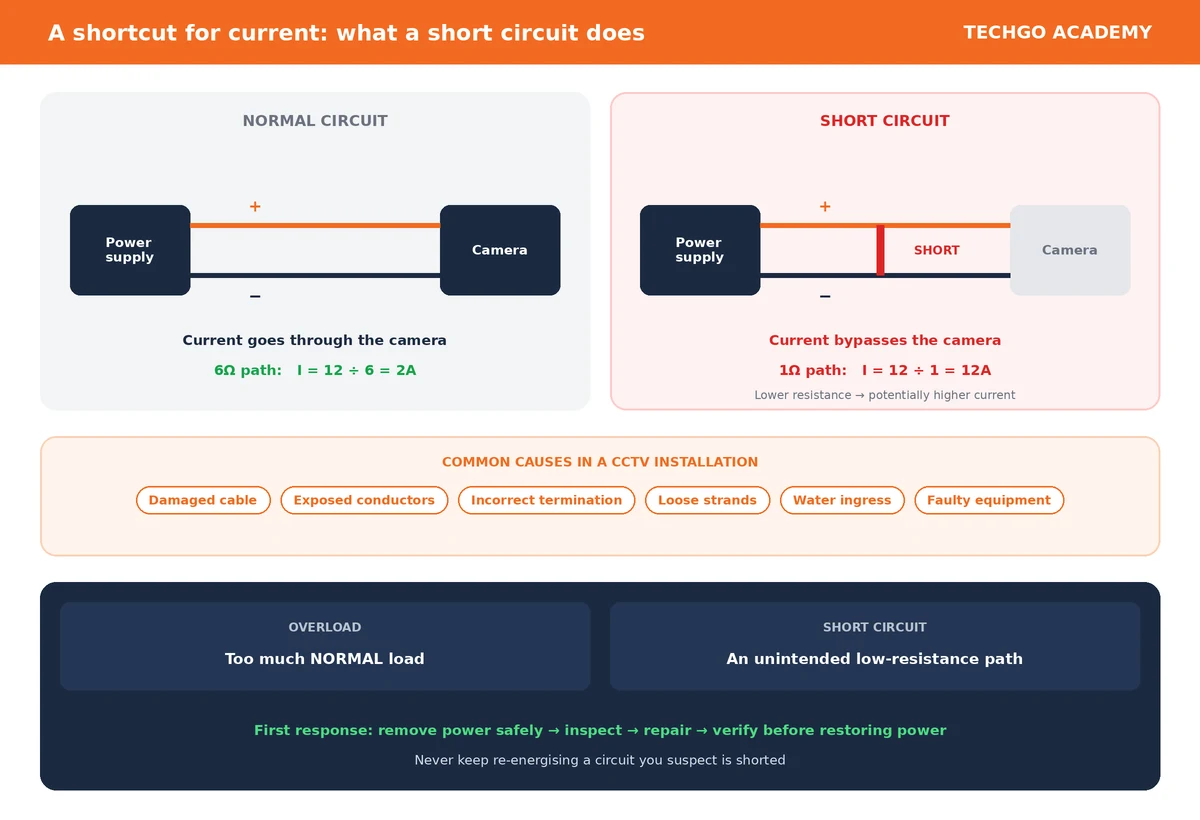
Power supply (+) → Camera → Power supply (−)
The camera is part of the intended path. It presents resistance to the current and uses electrical power.
What Happens During a Short Circuit?
Now suppose the positive and negative conductors accidentally touch directly. The current can bypass the camera.
Instead of + → Camera → −, we now have roughly + → direct connection → −.
That is the unintended shortcut. Because this path can have very low resistance, the current can become very high.
Why Does Current Increase?
From Ohm’s Law: I = V ÷ R, where I is current, V is voltage, and R is resistance.
If the voltage stays the same but the resistance becomes very small, the current increases.
- A 12V supply meeting a path of 6Ω: I = 12 ÷ 6 = 2A
- The same supply meeting a path of only 1Ω: I = 12 ÷ 1 = 12A
The lower resistance allows much more current to flow. In a real short circuit the resistance may be even lower, although the actual current is limited by the power supply, the wiring, the protection devices, and other factors.
What Can Cause a CCTV Short Circuit?
- Damaged cable: the insulation is damaged, allowing conductors to touch.
- Exposed conductors: two exposed wires accidentally touch each other.
- Incorrect termination: a poorly terminated connector lets positive and negative conductors make contact.
- Loose strands: strands of a multi-strand conductor touch the wrong terminal.
- Water ingress: moisture entering an unsuitable or damaged outdoor connection creates an unintended electrical path.
- Damaged equipment: a fault inside a camera, power connector, power supply, or other device creates an unintended low-resistance path.
What Can Happen When a CCTV Circuit Shorts?
The result depends on the voltage, available current, wiring, equipment, and protection mechanisms. Possible effects:
- the power supply shutting down
- a fuse blowing
- a circuit breaker tripping
- a power supply entering protection mode
- voltage collapsing
- the camera going offline
- cables or connectors becoming hot
- damaged equipment
- arcing or sparks
- fire in severe circumstances
Many modern power supplies include short-circuit protection. When a short is detected, the supply may shut down temporarily or limit its output. This is a safety feature.
A Practical CCTV Example
A technician has a 12V CCTV power supply feeding several cameras. One camera suddenly goes offline. The technician disconnects it and finds the positive and negative conductors at the camera end touching. That is a possible short circuit.
The technician should not simply reconnect the wires and switch the power on repeatedly. The fault must first be identified and corrected.
Short Circuit vs Normal High Power Consumption
A camera may legitimately consume 10W because its infrared illumination, heater, or other features are running. That is normal if it is within the manufacturer’s specification.
A short circuit is different: an unintended electrical path, usually with very low resistance, that can cause excessive current.
High power consumption is not automatically a short circuit.
Short Circuit vs Overload
An overload occurs when a circuit or power supply is asked to provide more power or current than it is designed to handle. For example, a power supply rated 12V, 5A feeding equipment that collectively needs 7A is overloaded.
A short circuit involves an unintended low-resistance path.
- Overload → too much normal load
- Short circuit → unintended low-resistance path
The two can trigger similar protective responses, but they are not the same fault.
How a CCTV Technician Should Approach a Suspected Short
The first principle: do not keep repeatedly energising a circuit you suspect is shorted.
Instead:
- Remove power safely.
- Inspect the wiring and connections.
- Look for damaged insulation, exposed conductors, water ingress, or incorrect termination.
- Separate or repair the faulty connection.
- Verify the circuit before restoring power.
At higher technician levels, appropriate electrical test instruments will be used to confirm the fault. For now, the important lesson is to understand what a short circuit is and why it is dangerous.
The Key Idea
A short circuit is an unintended low-resistance path that allows excessive current to flow.
The relationship comes straight from Ohm’s Law, I = V ÷ R. Therefore: lower resistance → potentially higher current. That is why short circuits must be taken seriously.
Step 2.4 — Knowledge Check
- What is a short circuit?
- Why is a short circuit sometimes described as an electrical “shortcut”?
- What happens to current when resistance becomes very low?
- Which formula explains this relationship?
- Name three things that can cause a short circuit in a CCTV installation.
- What might happen when a CCTV power supply detects a short circuit?
- Is high power consumption automatically the same as a short circuit? Explain.
- What is the difference between an overload and a short circuit?
- What should a technician do before investigating a suspected short circuit?
- Why should a technician avoid repeatedly switching a suspected shorted circuit back on?
Remember:
- Short circuit = unintended low-resistance path
- Lower resistance → potentially higher current
- Possible result → protection activates, equipment is damaged, or wiring overheats
- First response → remove power safely and investigate the fault
We have now learned what electricity is, how AC and DC differ, how CCTV equipment consumes power, how polarity works, and what a short circuit is. The next step is to understand how a CCTV technician works safely around electricity.
Why Electrical Safety Matters
Electricity is extremely useful, but it can also cause:
- electric shock
- burns
- equipment damage
- fire
- and, in severe cases, death
A CCTV technician may work with both low-voltage DC circuits, such as camera power, and AC mains electricity, such as the building’s electrical supply. These should never be treated as carrying the same level of risk. A 12V DC camera circuit and a 230V AC mains circuit are very different safety situations.
The Most Important Rule
Never work on an electrical circuit as though it is dead until you have safely isolated it and verified that it is de-energised.
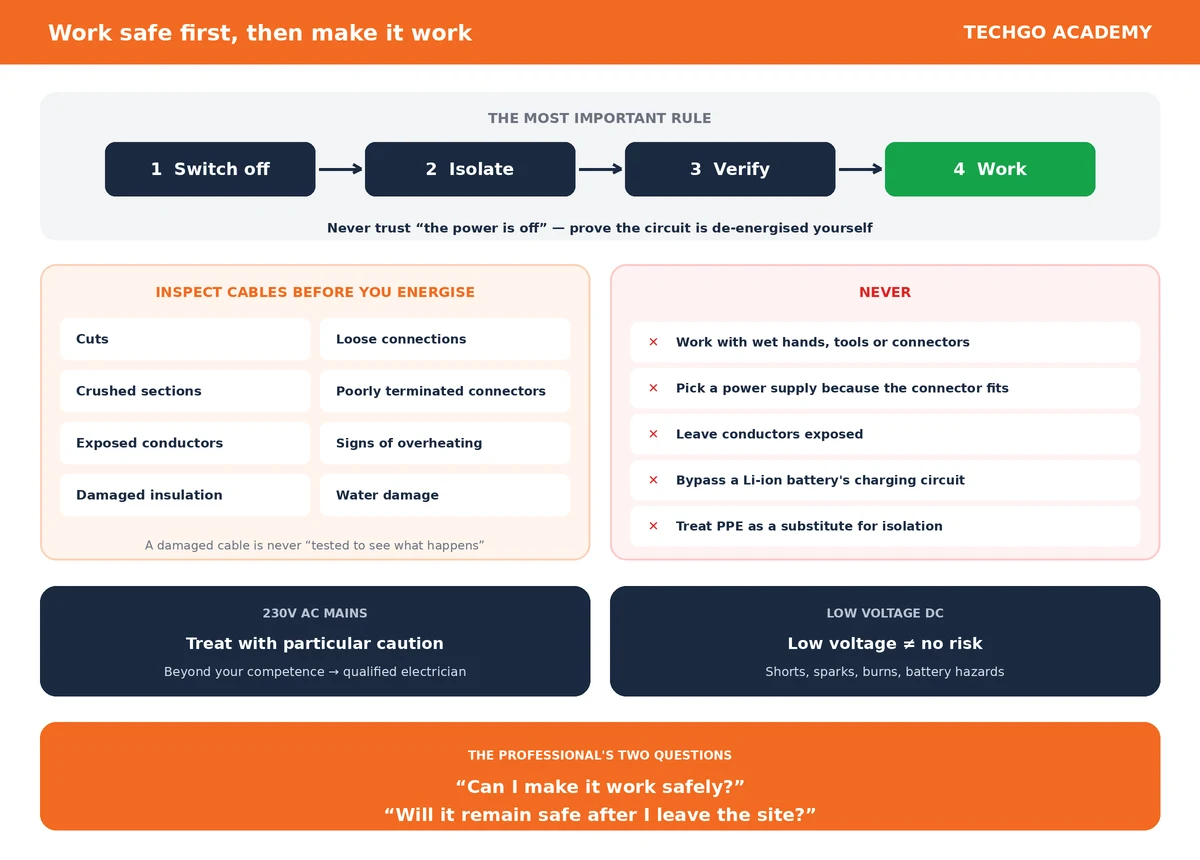
In simple terms: Switch off → isolate → verify → work
Do not rely only on someone saying “the power is off.” Establish that the circuit you are about to work on is actually de-energised.
AC Mains Requires Particular Caution
A CCTV installation may connect to the building’s mains supply, for example 230V AC. This is hazardous and should be treated with appropriate respect. A CCTV technician should not casually open or work inside mains-powered equipment simply because it is associated with CCTV. Examples include:
- mains sockets
- distribution boards
- AC power supplies
- UPS units
- mains-powered CCTV equipment
Where work involves electrical installations beyond the technician’s competence or legal authorisation, it should be handled by a suitably qualified electrician.
Low Voltage Does Not Mean “No Risk”
A common mistake is to think, “It is only DC, so it is completely safe.” That is not correct. Low-voltage CCTV circuits can still create hazards such as:
- short circuits
- sparks
- burns
- damaged equipment
- overheated cables
- battery-related hazards
A rechargeable lithium-ion battery can store significant energy even though its nominal voltage is relatively low.
Low voltage reduces some electrical-shock risks, but it does not eliminate electrical hazards.
Switch Off Before Making Connections
When installing or modifying a CCTV power circuit, do not casually connect or disconnect wires while the circuit is energised. Where appropriate:
- Switch off the power.
- Disconnect or isolate the supply.
- Confirm that the circuit is no longer energised.
- Make the connection.
- Inspect the connection.
- Restore power only when it is safe to do so.
This reduces the risk of accidental short circuits, sparks, and equipment damage.
Do Not Work with Wet Hands
Water and electricity are a dangerous combination. Avoid working on electrical connections with:
- wet hands
- wet tools
- wet connectors
- or while standing in water
Outdoor CCTV installations need particular attention because rain, condensation, and moisture can enter poorly protected connections. This is one reason outdoor connections need appropriate waterproofing, enclosures, cable glands, connectors, and installation practices.
Inspect Cables Before Use
Before energising a CCTV installation, inspect the cables. Look for:
- cuts
- crushed sections
- exposed conductors
- damaged insulation
- loose connections
- poorly terminated connectors
- signs of overheating
- water damage
A cable that looks physically damaged should not simply be energised and “tested to see what happens.” First determine whether it is safe.
Use the Correct Power Supply
Never improvise by using a power supply simply because its connector fits. Check:
- output voltage
- current capacity
- polarity
- connector compatibility
- the manufacturer’s requirements
If a camera requires 12V DC, do not assume another adapter with a same-looking connector is suitable. It might have the wrong voltage, the wrong polarity, insufficient current capacity, or an incompatible output arrangement.
Protect Power Connections
CCTV power connections should be properly made and protected. Particularly for outdoor cameras, protect connections against:
- rain
- moisture
- dust
- accidental contact
- mechanical damage
A poorly protected connection can eventually develop faults even if it worked perfectly when first installed. Good installation is not simply “it works.” It should also be “it works safely and remains protected during normal service.”
Avoid Exposed Conductors
Electrical conductors should not be left unnecessarily exposed. Exposed wires can:
- touch each other
- touch metal parts
- create short circuits
- become damaged
- or accidentally be touched by a person
Proper termination and insulation are important parts of professional CCTV installation.
Do Not Overload Power Supplies
A power supply has a rated capacity. Suppose a power supply is rated 12V, 5A. Its nominal maximum output power is:
P = V × I = 12 × 5 = 60W
If the connected CCTV equipment requires more than the supply is designed to provide, the supply may become overloaded or enter protection mode. Power requirements should therefore be calculated before connecting multiple devices.
Give Extra Attention to Lithium-Ion Batteries
Battery-powered and solar CCTV cameras may contain rechargeable lithium-ion batteries. These should be handled according to the manufacturer’s instructions. A technician should not:
- puncture the battery
- crush it
- deliberately short its terminals
- use an inappropriate charger
- or bypass the camera’s intended charging circuitry
A damaged or swollen lithium-ion battery should be treated as a serious safety issue and handled according to appropriate battery-safety procedures.
Personal Protective Equipment
Depending on the work, appropriate PPE may include:
- safety footwear
- eye protection
- gloves appropriate to the task
- hard hat
- fall-protection equipment where required
PPE should not replace safe electrical procedures. Wearing gloves does not make it safe to work carelessly on an energised mains circuit. The safer approach is to eliminate or control the electrical hazard first.
Working at Height
CCTV installation often involves mounting cameras high on walls, ceilings, poles, roofs, warehouses, and building exteriors. Electrical safety is therefore only part of technician safety. When working at height:
- use suitable access equipment
- ensure ladders are stable
- do not overreach
- maintain appropriate three-point contact when required
- use fall protection where the situation requires it
- keep tools and materials from falling onto people below
A technically perfect CCTV installation is not a successful installation if the technician gets injured while performing it.
The Professional Technician’s Safety Mindset
A professional technician does not ask only, “Can I make this camera work?” The technician also asks, “Can I make it work safely?” and “Will it remain safe after I leave the site?”
This mindset is an important part of professional CCTV installation.
Step 2.5 — Knowledge Check
- Why is electrical safety important to a CCTV technician?
- What are the basic steps before working on an electrical circuit?
- Why should AC mains be treated with particular caution?
- Does low-voltage DC mean that there are no electrical hazards?
- Why should you avoid making or disconnecting electrical connections while they are energised?
- Why are wet hands and electrical connections dangerous?
- Name four things you should inspect on a CCTV cable before energising it.
- Why should you never choose a power supply simply because its connector fits?
- Why is outdoor CCTV wiring particularly vulnerable to environmental hazards?
- Why should a CCTV technician avoid bypassing the intended charging circuitry of a lithium-ion battery?
- Name three examples of PPE that may be appropriate for CCTV installation work.
- Why is PPE not a substitute for safe electrical procedures?
- What additional safety hazards can arise when installing cameras at height?
- In your own words, explain the difference between making a CCTV system work and making it work professionally and safely.
Module 3: CCTV Components
Every CCTV system is built from a handful of components, and each one has a specific job. Before you learn how any of them is specified, installed or configured, you need to be able to name each one and say what it does. This module introduces them one at a time, beginning with the most visible: the camera.
In this step, we will learn about four important parts of a CCTV system: the camera, the DVR, the NVR, and the XVR. At this Foundation level, the goal is simply to understand what each device is, what it does, and how they differ from one another.
We are not yet going into configuration, setup, camera specifications, networking configuration, ONVIF, or troubleshooting. Those subjects come later in the course.
1. Cameras
A CCTV camera is a device that captures images of a scene and converts what it sees into electronic video information that can be transmitted, processed, displayed or recorded.
In simple terms: the camera is the part of the CCTV system that sees. If you point a camera at a gate, for example, the camera captures what is happening at that gate.
How a camera sees
A camera works in a way that is broadly similar to the human eye. The human eye receives light from the surroundings and allows us to see an image. A camera also receives light from the surroundings and uses its internal electronic components to produce a video image.
At a basic level: Light from the scene → Camera → Video information
The camera does not simply “take a picture” once. A CCTV camera continuously captures a sequence of images, producing video.
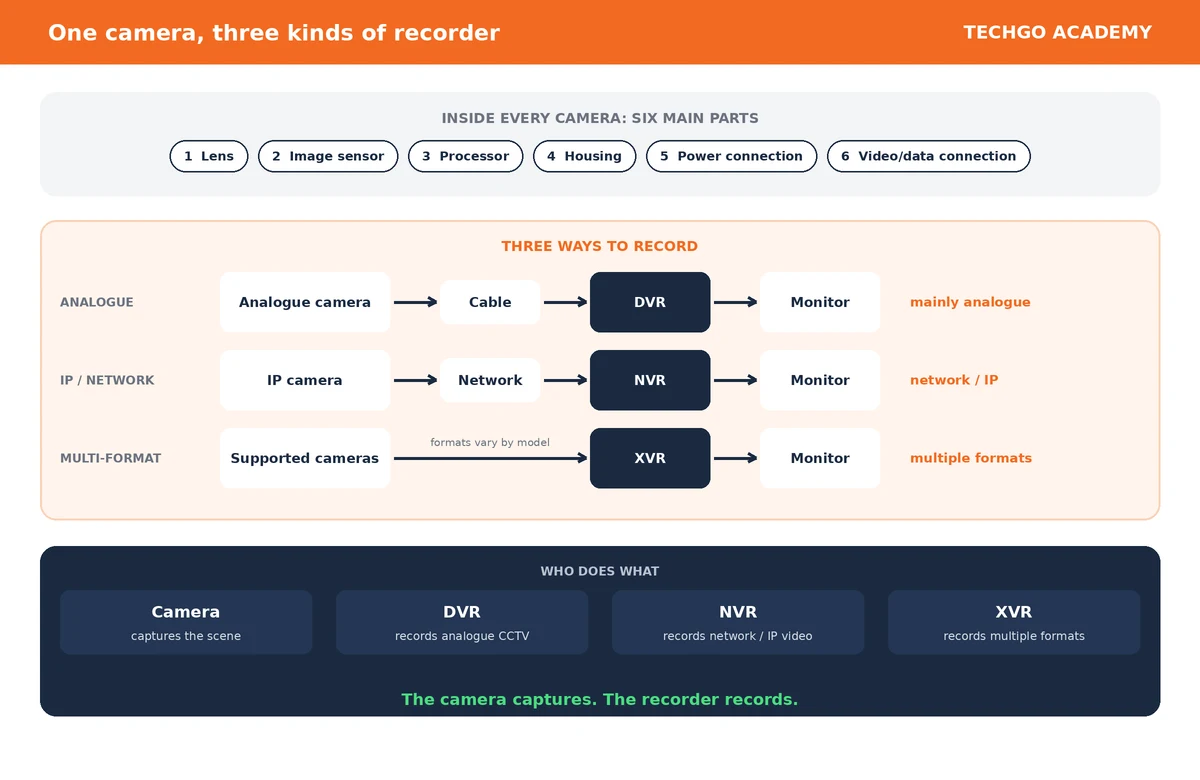
Main parts of a camera
A CCTV camera contains several important parts.
- Lens. Receives and focuses light onto the image sensor. It plays an important role in determining what part of the scene the camera can see. For example, a camera looking at a doorway needs to see the doorway clearly within its view. Camera lenses and their specifications are studied in much greater detail in Level 2, and are not part of this Foundation-level explanation.
- Image sensor. Receives the light coming through the lens and converts it into electronic information from which the video image is produced. Modern CCTV cameras predominantly use CMOS image sensors. You do not need to study sensor specifications at this stage. For now, remember: the image sensor is the part that converts the light received by the camera into electronic image information.
- Processor. The camera also contains electronic processing circuitry. It processes the information coming from the image sensor and helps produce the video output. Depending on the camera, the processing may include image enhancement, exposure handling, noise reduction and other forms of image processing. The detailed specifications and features of camera processing belong to later study.
- Housing. The physical body that contains and protects the camera’s internal components. It may be designed for indoor or outdoor use and may provide protection against environmental conditions such as dust, water or physical impact, depending on the particular camera.
- Power connection. A camera needs electrical power to operate. Depending on the camera, power may come through:
- a DC power connection
- Ethernet through PoE
- USB-type power
- an internal rechargeable battery
- another manufacturer-specific power arrangement
- Video or data connection. The camera needs a way to send its video information to another part of the system, unless it is a type that stores or handles the video internally. The method depends on the type of camera. For example:
- Analogue camera → cable → DVR
- IP camera → network → NVR
Analogue and IP cameras
At Foundation level, there is one basic distinction that is important to understand. An analogue camera sends its video using an analogue video transmission method. An IP camera, on the other hand, produces digital video that is transmitted over a network.
Two simplified examples:
- Analogue CCTV: Scene → Analogue camera → Cable → DVR
- IP CCTV: Scene → IP camera → Network → NVR
Analogue and IP systems are studied in much greater depth at the appropriate later levels.
Does every camera need a separate power cable?
No. Different cameras can receive power in different ways.
- A traditional wired camera may use a separate power connection.
- An IP camera may receive both data and power through an Ethernet cable when PoE is used.
- A battery-powered camera may have an internal rechargeable battery.
- A solar-powered camera may receive energy from a solar panel, which charges its battery.
Do not assume that every CCTV camera must have a separate power cable.
The basic role of the camera
The simplest way to remember the camera’s role: the camera captures the scene. It is the part of the CCTV system that provides the video.
The camera, however, is not normally the device responsible for storing all the recorded video in a traditional CCTV system. That brings us to the next device.
2. DVR
DVR stands for Digital Video Recorder. A DVR is a device used to receive, process and record video from compatible CCTV cameras.
In simple terms: the DVR is the recorder used in an analogue CCTV system.
A basic analogue CCTV system can be represented as: Camera → DVR → Monitor
The camera captures the scene. The DVR receives the camera’s video and records it. The monitor allows the user to see the video.
What does a DVR do?
At Foundation level, remember three basic functions:
- Receives video from cameras
- Records the video
- Provides recorded or live video for viewing
Imagine a small shop with several analogue CCTV cameras watching different areas. The cameras send their video to the DVR. The DVR records the video so that the shop owner can later view what happened.
Why is the DVR important?
Without a recorder, a traditional CCTV camera can provide a view of what is happening, but there would normally be no central device performing the traditional recording function. The DVR gives the system a place to record and retain video.
The detailed operation and configuration of DVRs is taught later in Level 4 — Analogue CCTV, particularly in DVR Configuration. We will not cover those procedures here.
3. NVR
NVR stands for Network Video Recorder. An NVR is a device used to receive, manage and record video from network/IP cameras.
In simple terms: the NVR is the recorder used for an IP/network CCTV system.
A basic IP CCTV system can be represented as: IP camera → Network → NVR → Monitor
The IP camera captures the scene. The network carries the camera’s video data. The NVR receives and records the video. The monitor allows the video to be viewed.
What does an NVR do?
At Foundation level, remember these basic functions:
- Receives video from network/IP cameras
- Records the video
- Provides recorded or live video for viewing
Just as a DVR is an important recorder in an analogue CCTV system, an NVR is an important recorder in an IP CCTV system.
Why is it called a Network Video Recorder?
The word Network is important. An NVR is designed around network-based video. Instead of receiving traditional analogue video directly from analogue cameras, it works with video that is transmitted as network data from IP cameras. This is one of the fundamental differences between a DVR and an NVR.
The detailed architecture, camera registration, ONVIF and NVR configuration are taught later in Level 5 — IP CCTV.
4. XVR
XVR is a type of hybrid/multi-format digital video recorder designed to work with more than one type of CCTV video technology.
In simple terms: an XVR is a recorder designed to support multiple CCTV camera formats.
The exact formats supported depend on the particular XVR. This means an XVR can provide greater flexibility than a recorder designed for only one camera technology. For example, an XVR may support combinations of analogue formats and, depending on the model, certain network/IP cameras.
The important Foundation-level idea: XVR = a recorder designed to support multiple CCTV technologies or formats. We do not need to study the individual supported formats or configuration procedures at this stage.
5. How DVR, NVR and XVR differ
Now we can compare the three recording devices.
- DVR = Digital Video Recorder. Its traditional role is to record video from analogue CCTV cameras. Basic idea: Analogue camera → DVR
- NVR = Network Video Recorder. Its role is to record video from network/IP cameras. Basic idea: IP camera → Network → NVR
- XVR = multi-format/hybrid recorder. Its role is to support multiple CCTV video technologies or formats, depending on the particular device. Basic idea: Multiple supported camera formats → XVR
The simplest way to remember the difference
| Device | Basic role |
|---|---|
| DVR | Recorder for traditional analogue CCTV |
| NVR | Recorder for network/IP CCTV |
| XVR | Recorder designed to support multiple CCTV formats |
So: DVR → mainly analogue. NVR → network/IP. XVR → multiple formats.
This is a Foundation-level distinction. It is enough for you to correctly identify the three devices and understand their basic purpose.
6. Camera vs DVR vs NVR vs XVR
A camera and a recorder do not perform the same job.
- Camera: captures the scene.
- DVR: records video from compatible analogue CCTV cameras.
- NVR: records video from network/IP cameras.
- XVR: records video from multiple supported CCTV formats.
A simple traditional CCTV chain can be understood as: Scene → Camera → Recorder → Display. The particular recorder depends on the CCTV technology being used.
- Analogue system: Scene → Analogue camera → DVR → Monitor
- IP system: Scene → IP camera → Network → NVR → Monitor
- Multi-format system: Supported cameras → XVR → Monitor
7. Do not confuse the four devices
A beginner can easily confuse these devices because they all appear as part of the same CCTV system. Use these simple questions:
- “Which device sees?” Camera.
- “Which device records analogue CCTV video?” DVR.
- “Which device records network/IP camera video?” NVR.
- “Which recorder supports multiple CCTV formats?” XVR.
That is the essential distinction at this level. The deeper technical differences are introduced later, at the appropriate stages of the course.
Step 3.1 — Knowledge Check
Answer these questions without looking back at the lesson if possible.
- What is the main job of a CCTV camera?
- What does DVR stand for?
- What is the basic purpose of a DVR?
- What does NVR stand for?
- What is the basic purpose of an NVR?
- What does XVR generally mean in CCTV?
- Which of the four devices is primarily responsible for capturing the scene?
- Which recorder is traditionally associated with analogue CCTV?
- Which recorder is designed around network/IP cameras?
- What is the main reason an XVR is different from a traditional DVR?
- Complete this basic chain: Scene → ______ → DVR → Monitor
- Complete this basic IP CCTV chain: Scene → IP camera → ______ → NVR → Monitor
- In one sentence, explain the difference between a camera and a recorder.
- In one sentence each, explain the basic difference between a DVR, NVR and XVR.
Key point to remember: The camera captures. The recorder records. DVR = analogue CCTV recorder. NVR = network/IP CCTV recorder. XVR = multi-format CCTV recorder.
In Step 3.1, we learned about cameras, DVRs, NVRs and XVRs. In this step, we will learn about three other important CCTV components: the PoE switch, the hard drive, and the power supply.
At this Foundation level, our goal is to understand what each component is and what it does. We will not yet study detailed PoE standards, power budgets, storage calculations, or advanced power design. Those subjects belong to later levels of the course.
1. PoE Switch
PoE means Power over Ethernet. A PoE switch is a network device that can provide network communication and electrical power through Ethernet cables to compatible devices.
In simple terms: a PoE switch can use one Ethernet cable to carry both data and power to a compatible CCTV camera. This is particularly useful with IP cameras.
What does a PoE switch do?
A PoE switch performs two basic jobs relevant to CCTV:
- It provides a network connection.
- It can provide electrical power to compatible devices through the Ethernet cable.
For example: IP camera ← Ethernet cable → PoE switch
The same Ethernet cable can carry:
- Data: the camera’s network/video communication
- Power: electrical power for the camera
This can reduce the number of separate cables required to connect a compatible IP camera.
Why is a PoE switch useful in CCTV?
Imagine installing several IP cameras in a building. Without PoE, each camera may need an Ethernet connection for network/data communication, and a separate suitable power source. With PoE, a compatible camera can receive both through its Ethernet connection. This can make an IP CCTV installation simpler and neater.
Is every network switch a PoE switch?
No. A normal network switch provides network connectivity, but it does not necessarily provide electrical power through its Ethernet ports. A PoE switch is specifically designed to provide PoE power to compatible devices.
All PoE switches are network switches, but not all network switches are PoE switches.
Is PoE only for cameras?
No. PoE technology can also be used with other compatible network devices. However, in CCTV work, one of its most familiar uses is powering IP cameras.
Important Foundation point
Do not think of PoE as a different type of Ethernet cable. PoE refers to the ability to deliver power through the Ethernet connection using compatible equipment.
The detailed PoE standards, power limits and power-budget calculations are studied later in Level 5 — IP CCTV, Module 18: PoE.
2. Hard Drives
A hard drive, commonly called an HDD (Hard Disk Drive), is a storage device used to store recorded video. In a traditional CCTV recording system, the hard drive is installed inside the recorder, such as a DVR or NVR.
In simple terms: the hard drive is where recorded CCTV video can be stored.
What does a hard drive do?
When a CCTV system is recording, the recorder needs somewhere to save the video. The hard drive provides that storage space.
Camera → Recorder → Hard drive
The camera provides the video. The recorder manages the recording. The hard drive stores the recorded video.
Why is a hard drive important?
Imagine a CCTV camera watching a shop entrance. If the system records what the camera sees, the recorded video has to be stored somewhere. The hard drive provides the physical storage space needed for this. Without suitable storage, a recorder cannot retain recorded footage in the normal way.
Is the hard drive the recorder?
No. This is an important distinction. The DVR or NVR is the recorder. The hard drive is the storage device inside the recorder.
- Recorder = manages the recording
- Hard drive = stores the recorded video
A simple example
Suppose a DVR is recording four cameras. The cameras send video to the DVR. The DVR processes and records the video. The hard drive inside the DVR stores that recorded video.
- Cameras → DVR → Hard drive
- The same basic storage concept applies to an NVR: IP cameras → NVR → Hard drive
The detailed subjects of video compression, storage calculations, retention periods and HDD capacity are taught later in Level 7 — CCTV Storage & Bandwidth.
3. Power Supplies
A power supply is a device that provides electrical power in a form suitable for the equipment it is intended to operate. In CCTV, power supplies are used to provide electrical power to devices such as cameras and other CCTV equipment, depending on the system.
In simple terms: a power supply provides the electricity that a CCTV device needs to operate.
Why does CCTV equipment need a power supply?
Electronic CCTV devices cannot operate without suitable electrical power. A camera needs power to operate its electronic components. A recorder also needs electrical power. A power supply provides the required electrical energy in a suitable form.
A simple example
Consider a conventional wired CCTV camera that requires DC power. A suitable power supply provides the required DC power to the camera. The basic arrangement:
AC mains → Power supply → DC power → Camera
The power supply acts as the source that makes the required electrical power available to the camera.
Power supply does not mean “any source of electricity”
This is very important. A CCTV device must receive suitable power. The power supply must be appropriate for the device. A power supply that is unsuitable for a particular device can cause malfunction or damage.
The basic electrical principles we learned in Module 2, such as voltage, current, power and polarity, help us understand why choosing the correct power source matters. At this stage, however, we are only identifying the component and its basic function.
Common forms of CCTV power supply
CCTV systems can use different methods of supplying power. For example:
- individual power adapters
- centralised CCTV power supplies
- PoE switches
- other manufacturer-specific power arrangements
The method used depends on the equipment and the system design. A PoE switch is itself a special case because it can provide power to compatible network devices through Ethernet.
4. How These Three Components Differ
The three components perform completely different jobs.
- PoE switch: provides network connectivity and, for compatible devices, power through Ethernet.
- Hard drive: stores recorded CCTV video.
- Power supply: provides suitable electrical power to CCTV equipment.
So remember: PoE switch → connects and can power. Hard drive → stores. Power supply → supplies power.
5. How They Work Together
These components can work together as parts of a complete CCTV system. Consider an IP CCTV system using PoE. A simplified arrangement:
IP camera → PoE switch → NVR → Hard drive
The roles are different:
- The IP camera captures the scene.
- The PoE switch provides network connectivity and can provide power to the compatible camera.
- The NVR receives and records the video.
- The hard drive stores the recorded video.
Where a separate power supply is used, it provides the electrical power required by the relevant equipment. For example: AC mains → Power supply → CCTV equipment. The exact arrangement depends on the system.

6. Do Not Confuse These Components
A beginner should be able to identify the difference immediately.
- PoE switch vs power supply. Both can be associated with supplying power, but they are not the same thing. A PoE switch is primarily a network device that can also deliver power through Ethernet to compatible devices. A power supply is primarily an electrical power source for equipment.
- Hard drive vs recorder. A hard drive stores the recorded video. The DVR or NVR is the device that performs the recording function. The hard drive is not the DVR or NVR. It is a storage component used by the recorder.
- PoE switch vs hard drive. These have completely different purposes. The PoE switch deals with network connectivity and, where applicable, power delivery. The hard drive deals with storage.
7. The Foundation-Level Picture
At this point, you should be able to see how several CCTV components fit together. For a basic IP CCTV system:
- Camera captures the scene
- PoE switch provides network connectivity and may provide power
- NVR records the video
- Hard drive stores the recorded video
- Monitor displays the video
And where a separate power source is required: Power supply provides suitable electrical power to the relevant equipment.
Each component has its own job. A good CCTV technician must be able to identify the component and understand why it is present in the system.
Step 3.2 — Knowledge Check
- What does PoE stand for?
- What is the main purpose of a PoE switch in an IP CCTV system?
- What two things can a PoE switch deliver through an appropriate Ethernet connection?
- Is every network switch a PoE switch?
- What does HDD stand for?
- What is the main purpose of a hard drive in a CCTV recorder?
- Is a hard drive the same thing as a DVR or NVR? Explain your answer.
- What is the basic purpose of a CCTV power supply?
- Why can’t we use just any power supply for a CCTV device?
- Complete the following: Camera → NVR → ______
- Complete the following: IP camera → ______ → NVR
- Which component primarily deals with storage?
- Which component can provide both network connectivity and power to a compatible IP camera?
- Which component primarily provides electrical power to equipment?
- In one sentence, explain the difference between a PoE switch, hard drive and power supply.
Key point to remember: PoE switch = network connection + power for compatible devices. Hard drive = storage for recorded video. Power supply = provides suitable electrical power.